Agentic Web Search, Built Into Your Executive Search CRM

Describe who you are looking for in plain language.
An AI agent searches the public web, reads what it finds and returns people with the evidence behind them, ready to add to an assignment or a client list in Talentis.

💬 SEARCH: “Find CFOs at software companies with international expansion experience.”

✨ RESULT: Relevant people, supported by evidence from public web sources.
 

✅ Candidate sourcing & business development
✅ Sources included
✅ Add to CRM in one click

Book a demo now before starting a free trial!

What is Agentic Web Search?

Agentic Web Search is a feature of Talentis, the executive search CRM with candidate sourcing built in. Instead of matching keywords against a stored profile database, an AI agent runs a chain of searches across public sources, considers each person against your brief, and explains why they fit.


Most search tools can only see what people write about themselves in a profile. The facts a search consultant needs are often published by someone else: a company announcing an appointment, an annual report naming the board, a regulator listing a director, a conference naming a speaker. Agentic Web Search reads those sources directly, so it finds people whose profiles are missing, thin or out of date.


Because it runs inside Talentis, what it finds becomes part of your firm’s own data: people and companies in your executive search CRM, linked to the assignment or prospect list they belong to.

One search, two jobs: finding candidates and winning clients

Search firms grow by placing candidates and by winning mandates. Agentic Web Search does both, from the same search box.

Candidate sourcing icon

Candidate sourcing

Build longlists that go beyond the usual networks, and check that everyone on them is still in the role your records show.


  • Find executives by what they have done, not only their job titles
  • Identify directors and trustees who have no usable profile
  • Surface adjacent candidates from neighbouring sectors and markets
  • Confirm current roles before the first call


💬 “Find potential CEOs for a private-equity-backed manufacturer with about 1,000 employees, based within an hour of Chicago, with turnaround experience.”

Business development icon

Business development

Spot the leadership changes that create mandates, and find the decision-makers to call, before your competitors do.


  • Track new CEO, CFO and HR leader appointments in your sectors
  • Find companies going through restructuring, funding or acquisition
  • Map private equity portfolios and their operating partners
  • Identify board changes and departing executives that signal a search


💬 “Which private-equity-backed healthcare services companies in the US have appointed a new chief executive in the last six months?”

How it works

 icon

Describe the brief


Write it as you would to a researcher: role, sector, size, location and must-have experience.

 icon

The agent plans its searches


It turns the brief into a series of searches across public professional information.

 icon

It reads and checks


It reads the pages it finds and follows up where a fact is missing, using what each search turns up.

 icon

You get evidence, not just names


Each person comes with a short synopsis of why they fit and links to every source.

 icon

Save to Talentis


Add the right people to an assignment, a talent pool or a prospect list in one click.

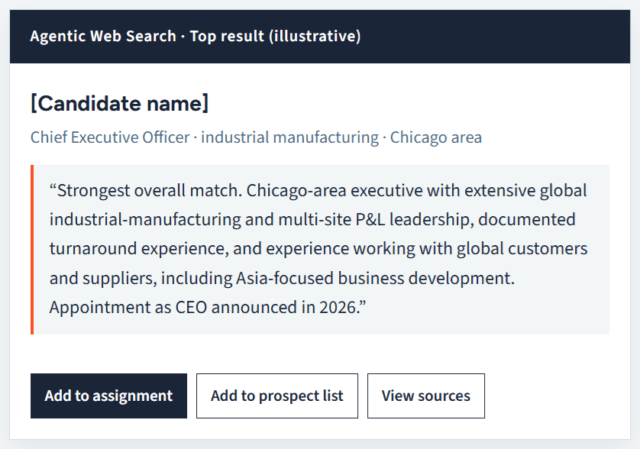
Agentic Web Search result in Talentis (illustrative)

What a result looks like

This result came from a test run of the Chicago CEO brief above. The top candidate was found through a press release announcing the candidate’s latest appointment, a fact a profile database would only show once the candidate updated their own profile.


The agent also says what its sources do not prove. In another test, for a UK healthcare CFO brief, it flagged that the evidence described the candidate as financial director, and recommended confirming current position and appetite before treating them as a CFO-level candidate. That judgement stays with your researcher.


Example lightly edited to protect the candidate’s identity.

Why agentic search finds what profile search cannot

A profile search is limited to one self-written record per person. An agentic search builds its answer from many sources, most of them written by someone other than the candidate.


Comparison Profile search Agentic Web Search in Talentis
What is searched One record per person, largely self-written Any public page that could help answer the brief
How a match is made Keywords and filters against profile fields The agent reads pages and considers fit against the brief
When a fact is missing The person is not returned The agent looks for the fact in another source
How current it is As current as the last profile update or database refresh Reads each source as it stands when the search runs
What you get back A list of profiles A synopsis of fit with links to every source
Where results go Exported or copied into your CRM You review each result, then add it to the Talentis CRM in one click


Agentic Web Search works alongside the TalentGraph, the fast, filterable index of professional profiles already in Talentis.

Use the TalentGraph for speed and volume, and Agentic Web Search when the brief needs depth or the people you need are hard to find.

Why it belongs inside your CRM

A list of names is the start of the work, not the end of it. Running the search inside Talentis removes the steps that usually follow.


● No import, no retyping: Review each result, then add the people you want to the assignment or prospect list you are working on in one click.


● Checked against what you know: See at a glance who is already in your database, so researchers do not duplicate records or approach the same person twice.


● A trail you can stand behind: Every fact keeps its source link, so you can show clients and candidates where information came from.

See Agentic Web Search on one of your own briefs

Bring a live search or a sector you want to win business in. We will run it in Talentis during the demo and show you what comes back.

Book a demo

Frequently Asked Questions

What is Agentic Web Search?

Agentic Web Search is a feature of the Talentis executive search CRM. An AI agent searches the public web for people who match a brief, reads what it finds, and returns each person with a short synopsis and links to the sources, ready to add to an assignment or a client list.

Does Agentic Web Search cost extra?

No. Agentic Web Search is included in every Talentis subscription at no extra charge. See Talentis pricing.

Can I use it for business development?

Yes. The same search that finds candidates can find prospective clients: newly appointed CEOs and HR leaders, companies going through leadership change, private equity portfolio companies and the decision-makers behind them. The ones you choose can be added to the Talentis CRM as contacts and companies in one click.

How is it different from LinkedIn Recruiter or a profile database?

A profile database can only match a brief against what each person wrote in their own profile. Agentic Web Search assembles the answer from many public sources, such as company leadership pages, press releases, filings, registries and conference programmes, so it can find people whose profiles are missing, thin or out of date. Compare Talentis with LinkedIn Recruiter.

Where does the information come from?

From publicly available professional information on the web. Every result links to the pages it came from, so researchers can check each fact before anyone is added to the CRM.

Does it replace the TalentGraph?

No. The TalentGraph is a fast, filterable index of professional profiles. Agentic Web Search adds depth and currency by reading live public sources. Researchers use both from the same search screen in Talentis.

Can't I just ask ChatGPT?

A general AI assistant with web search can produce a plausible list. Agentic Web Search is built for executive search, returns a consistent format for every researcher, and lets you add the people you choose to the CRM in one click, rather than copying them out of a chat window by hand.